PublishMyReviewspublishmyreviews

Built for cafes and restaurants

Reviews and social proof for cafes, restaurants, and takeaway brands. From table to story.

The window between a great meal and the customer walking out is short — usually four or five minutes while the bill arrives. Most review-software stacks miss it entirely. A QR on the table tent, a sticker on the bill folder, and a sticker on the takeaway packaging are three small placements that capture the testimonial inside that window, where the meal still tastes like the meal.

Last verified for cafes and restaurants on 2026-06-06.

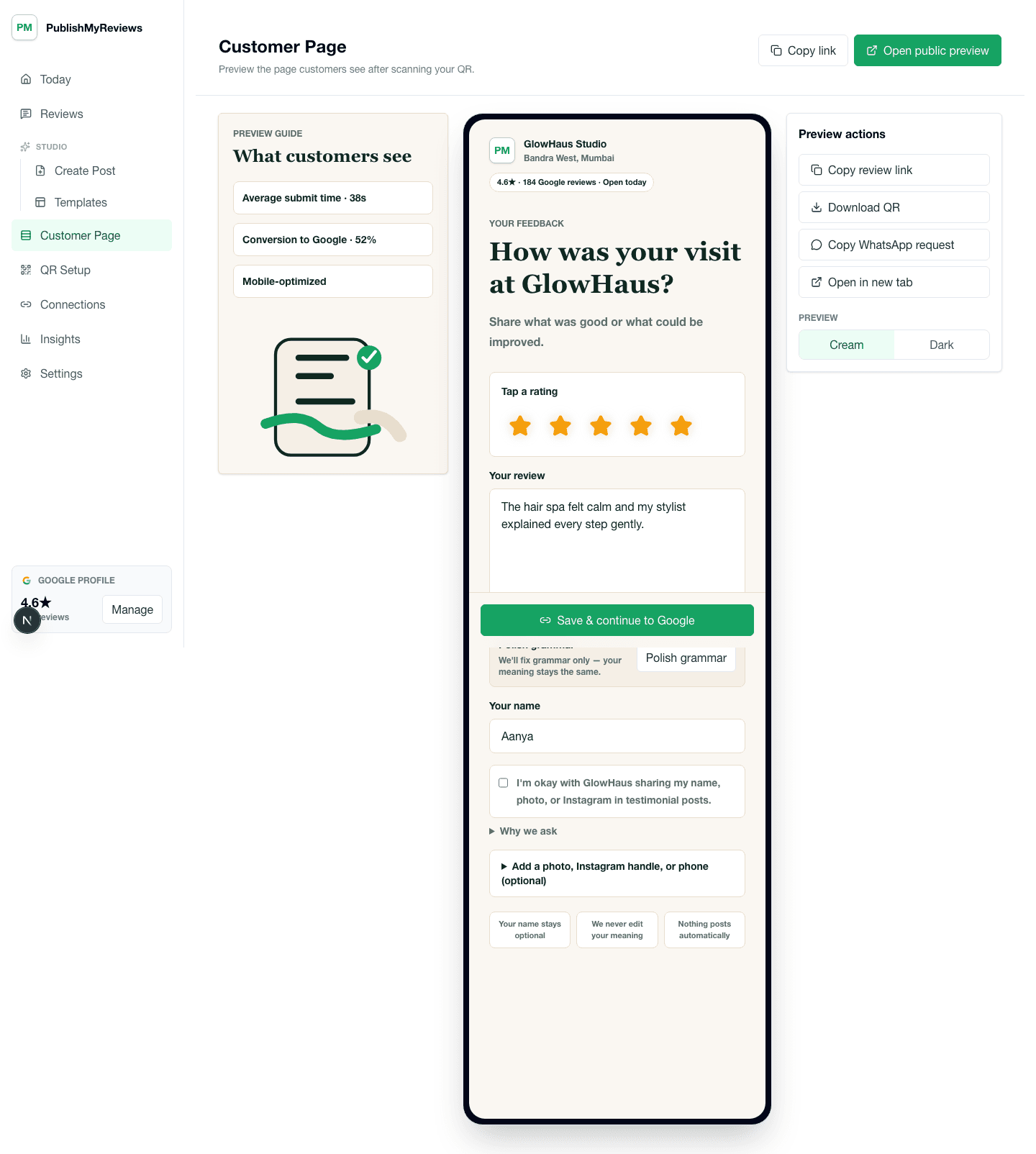
Customer QR review page with rating, testimonial, consent, photo, and Google continuation options.

QR moments

Where the QR earns its place in a cafe day.

The whole product is built around small, specific moments. Place the QR card where the customer already pauses, and the testimonial captures itself. Place it in the wrong moment and you get the silence every review-software brochure pretends does not happen.

The table tent

On the table, next to the salt and pepper

The most-read print surface in any cafe. Customers pick it up while waiting, scan, and either drop a quick rating during the meal or fill in a longer testimonial after — depending on whether they came with friends or alone. The card should be small, weighted, and not block the view.

The bill folder

QR sticker on the inside of the bill folder

Better than the table tent for solo diners or business lunches where the table itself stays clean. The customer pays, sees the QR while waiting for the card to clear, and either scans then or takes a photo for later.

The takeaway sticker

On the bag, the lid, or the packaging insert

Useful for delivery and takeaway-heavy cafes. Customers eating at home are often more thoughtful about leaving a real testimonial than customers in a noisy room. The sticker should mention the dish category if your menu has signature items — 'how was the biryani' lands better than 'how was your meal'.

The post-meal WhatsApp

Sent the same evening to customers who paid by UPI / phone-linked card

For higher-end restaurants that already have customer phone numbers on file via the booking system, a soft WhatsApp the same evening — 'thank you for choosing us tonight, if you would like to share feedback...' — converts the experience to a public review while the meal is still in memory.

Objections

What cafe and restaurant owners usually push back on.

Honest answers to the four objections we hear most often from owners in this vertical. If we cannot answer one cleanly, we say so.

Concern

My staff is too busy to ask for reviews. Service comes first.

The QR card asks. Staff do not. The whole point of a counter QR is that there is no verbal request, no script, no awkward moment — the customer chooses to engage or not. Staff should not even mention it during a busy service; the card does its job by existing.

Concern

What about food-delivery aggregator reviews? Most of my reviews come through Swiggy or Zomato.

Aggregator reviews live on the aggregator and rarely transfer to your Google profile or your Instagram. PublishMyReviews captures direct-customer reviews — dine-in, direct takeaway, your own delivery — which roll up to your Google Business Profile (the broader trust signal) and your social proof. The two are complementary, not overlapping.

Concern

I worry about fake reviews from competitors.

PublishMyReviews can rate-limit submissions per device and per IP, and the review inbox shows you every submission before publication. The Google handoff itself is on Google's side — Google has its own fake-review detection, which is much better than what any third-party tool can offer for the public Google review surface. Direct testimonials submitted through your QR are subject to your approval before they become public posts.

Concern

Customers do not want to give me their phone number for follow-up.

Phone number is optional on the customer page. Most cafes and restaurants get useful testimonials without it. The phone number is most relevant for follow-up WhatsApp Status sharing or replying to feedback, but the testimonial itself works without it.

What we capture

The testimonial-page prompts that fit a cafe.

The customer-facing review page asks for the things that make sense in your vertical and skips the things that do not. Field configurations are owner-controlled — turn any of these off if your business prefers.

Dish name (so the post can credit the actual food)
Occasion if relevant (date, family meal, business lunch — optional)
What you would order again
Optional photo of the dish (much more common for cafes than other verticals)
Optional Instagram handle so you can tag the customer in the published post
Consent to use the testimonial in your social posts

What good looks like

The post you can publish, the way it actually reads.

Three output formats most cafe and restaurant owners use the testimonial for, with notes on what tends to work for this vertical.

Format 1

Dish-photo Instagram post

A square Instagram post with the customer's photo of the dish (with their consent) and the testimonial overlaid as a quote. This is the highest-engagement output type for cafes — food photos perform predictably well on Instagram and the testimonial gives the post substance.

Format 2

WhatsApp Status with the dish

9:16 vertical with the dish photo and a one-line testimonial — perfect for keeping your existing customers reminded that you exist. Particularly useful for cafes with a strong takeaway and delivery business through WhatsApp.

Format 3

Branded reels-cover testimonial

When several testimonials come in over a week mentioning a specific dish, you can compile them into a reel cover or carousel post. The export gives you the raw testimonial cards; you handle the reel composition in your existing tool of choice.

Pricing

INR pricing, all-inclusive of taxes, no surprise bill at the end of the trial.

Starter at ₹999/month covers single-location cafes on the V1 plan. Growth at ₹1,999/month adds unlimited posts and team seats. Free 14-day trial, no credit card required.

FAQ

Vertical-specific questions.

The questions cafe and restaurant owners actually ask before signing up. If yours is missing, email support@publishmyreviews.com.

Do you support multi-location restaurant chains?

V1 supports one location per plan. If you run a chain (3-10 locations), email us at support@publishmyreviews.com — we have a chain pricing structure on request, with a single owner dashboard across locations. For 50+ locations, an enterprise tool like Birdeye is probably a better fit; see our honest comparison page for the trade-offs.

Can I capture reviews on the customer-page in Hindi or regional languages?

Customers can write the testimonial in any language they want. The customer-facing page UI is English-first today; Hindi UI is on the roadmap. Most cafe and restaurant testimonials in India come in a mix of English, Hindi, and regional languages — the testimonial captures whatever the customer types.

What about Zomato and Swiggy reviews — does this help with those?

No. Zomato and Swiggy reviews are platform-specific and live on their platforms. PublishMyReviews captures direct-customer reviews — dine-in, direct takeaway, your own ordering channels — and routes customers to Google. The two complement each other but PublishMyReviews does not modify, scrape, or sync aggregator reviews.

Will customers trust an unbranded QR card on the table?

The QR card is branded with your cafe's name and logo. Plain QR cards do underperform — that is one of the things the paid product handles that the free Google Review Link Generator does not. The branded card reads as part of your service rather than a tool stuck on top of it.

Pilot setup

Want to see this set up for your cafe?

We'll walk through QR placement, consent copy, approval flow, and what your first Instagram or WhatsApp-ready proof asset would look like — using your business name and brand colours.