PublishMyReviewspublishmyreviews

Built for dental clinics

Patient reviews and Google trust for dental clinics. Respectful by default.

Dental is a delicate vertical for reviews. Patients are happy with the outcome but rarely want to broadcast that they had a root canal. PublishMyReviews is built so the testimonial captures what the patient is comfortable sharing — usually the doctor's calm manner, the clinic's ambience, the anxiety reduction — without forcing them to disclose the procedure.

Last verified for dental clinics on 2026-06-06.

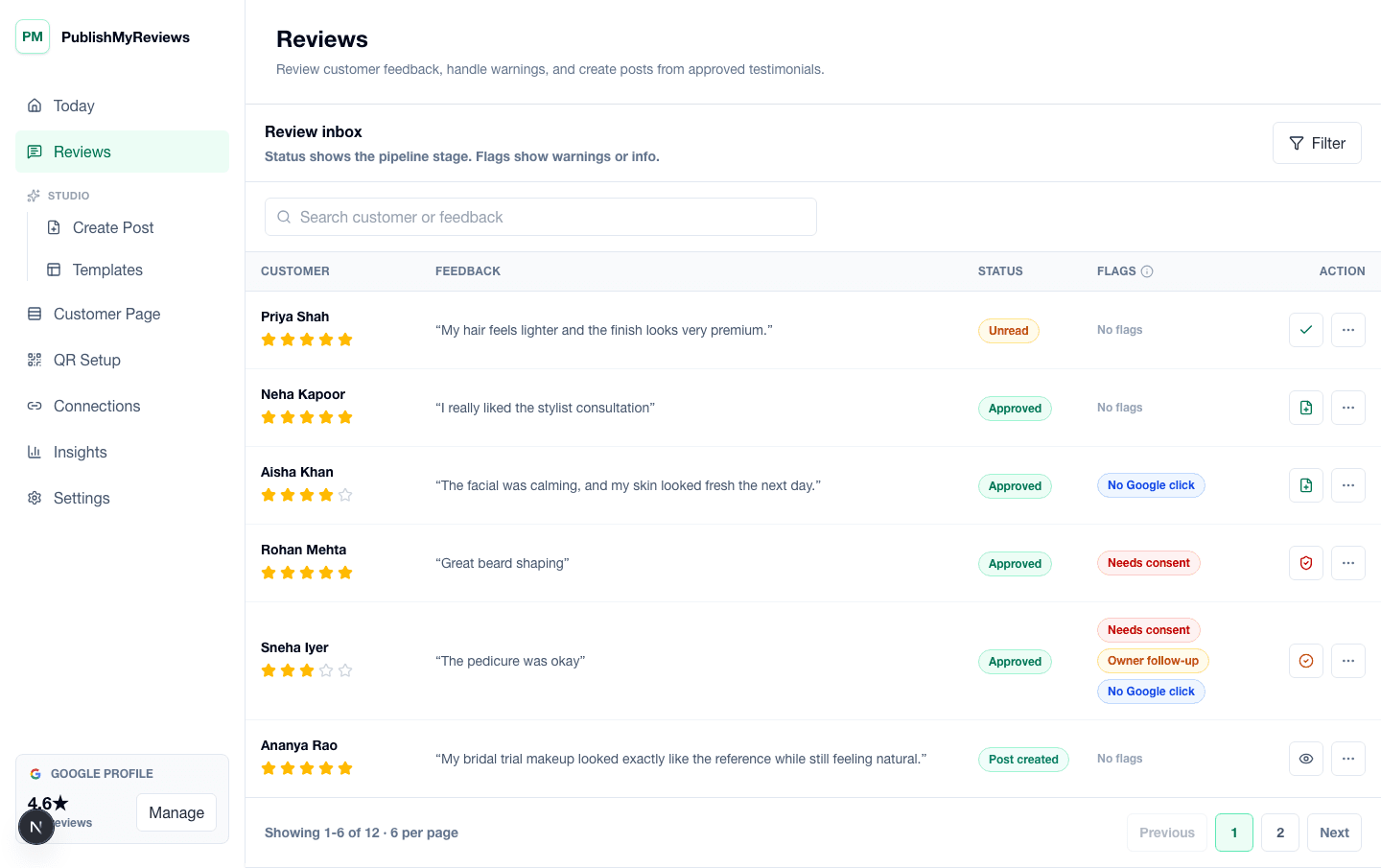
PublishMyReviews review inbox showing submitted testimonials, consent flags, and next steps.

QR moments

Where the QR earns its place in a dental clinic day.

The whole product is built around small, specific moments. Place the QR card where the customer already pauses, and the testimonial captures itself. Place it in the wrong moment and you get the silence every review-software brochure pretends does not happen.

The front-desk checkout

Counter card at the billing desk

After the appointment, while the patient is settling the bill or scheduling the next visit, the receptionist mentions the QR softly. No verbal review request — just an indication that the card exists. The patient scans if they want to.

The receipt envelope

QR sticker inside the receipt envelope

For clinics that hand patients a paper receipt or post-care instructions in an envelope, a discrete QR sticker on the inside of the envelope is found later when the patient is home and reflective — often the best moment for a thoughtful testimonial.

The post-visit WhatsApp

Sent from the clinic's WhatsApp Business an evening after the visit

A short, doctor-signed message thanking the patient and inviting them to share feedback if they would like. Works particularly well for routine visits (cleaning, check-up) where the patient is happy and not in pain.

The waiting-area card (carefully)

On the reception side table, NOT on treatment-area furniture

A small card on the side table is fine for patients who are about to leave. We deliberately do not recommend placing it in the treatment area — patients in the chair are stressed and consent in that moment is not really consent.

Objections

What dentists and clinic owners usually push back on.

Honest answers to the four objections we hear most often from owners in this vertical. If we cannot answer one cleanly, we say so.

Concern

Patient privacy is non-negotiable. I will not ask patients to share medical details on social media.

The customer-facing page does not ask for procedure details by default. The patient writes whatever they are comfortable sharing — most testimonials we see in dental are about ambience, the doctor's manner, anxiety reduction, and clinic cleanliness. The clinic owner approves what becomes a public post; nothing is auto-published.

Concern

The DPDP Act makes me nervous about handling patient data.

PublishMyReviews stores the review-page submission as data the clinic is the Data Fiduciary for, not us — we operate as the Data Processor under documented instructions. Consent is captured per testimonial, the patient can withdraw consent at any time, and we do not include patient identifiers in any post unless the patient explicitly opted in. The clinic gets the audit log.

Concern

I do not want patient photos on Instagram. Period.

The customer photo field is optional on the review page, and even when a patient uploads one, you choose whether to include it in the published post. Most dental clinics we see using PublishMyReviews publish text-only testimonials over a brand background, with the patient's first name only — and even that is opt-in.

Concern

What about negative reviews — could a patient complain through the QR?

Yes, and that is by design. A negative testimonial that lands in your review inbox first, before the patient posts publicly, gives you a chance to respond privately and resolve the issue. The customer still has the choice to continue to Google whatever their rating — but the private inbox often catches dissatisfaction early, when it can still be fixed.

What we capture

The testimonial-page prompts that fit a dental clinic.

The customer-facing review page asks for the things that make sense in your vertical and skips the things that do not. Field configurations are owner-controlled — turn any of these off if your business prefers.

Doctor name (so the post can credit the right dentist)
Visit type only at the broadest level (routine, cleaning, consultation) — never specific procedures
What you appreciated about the visit
Optional photo — almost always skipped for dental, which is the right default
Consent to use the testimonial in clinic social posts

What good looks like

The post you can publish, the way it actually reads.

Three output formats most dentists and clinic owners use the testimonial for, with notes on what tends to work for this vertical.

Format 1

Doctor-credited testimonial card

A clean text-only Instagram post with the patient's first name, the doctor's name, and the testimonial — no procedure details, no patient photo, no medical claims. The clinic logo and address sit in the corner.

Format 2

Ambience-focused brand post

A photo of the clinic interior or treatment room (no patient visible) with the testimonial overlaid as text. Particularly useful for patients whose feedback is about the calm environment or the clinic's design.

Format 3

WhatsApp Status to existing patients

9:16 vertical with a recent testimonial — good for staying top-of-mind with existing patients who might recommend the clinic to family. Particularly useful for clinics with a referral-heavy practice.

Pricing

INR pricing, all-inclusive of taxes, no surprise bill at the end of the trial.

Starter at ₹999/month covers single-location dental clinics on the V1 plan. Growth at ₹1,999/month adds unlimited posts and team seats. Free 14-day trial, no credit card required.

FAQ

Vertical-specific questions.

The questions dentists and clinic owners actually ask before signing up. If yours is missing, email support@publishmyreviews.com.

Does this comply with the DPDP Act for patient data?

Yes. The clinic is the Data Fiduciary for patient testimonials submitted through your QR; PublishMyReviews is the Data Processor acting on documented instructions. Consent is captured per submission, can be withdrawn, and is logged. Read the full split in our Privacy Policy. We do not use patient testimonials to train AI models or for any purpose outside what the clinic configures.

Can I prevent specific procedure names from appearing in published testimonials?

Yes. The owner-approval workflow means nothing publishes until you click approve. Most dental clinics we work with set a soft rule with the front desk: testimonials mentioning specific procedures get edited (with the patient's permission via the consent flow) to remove those details before publishing.

Is this useful for cosmetic-dentistry clinics where customers want before-after photos?

It can be. Cosmetic dentistry has a different patient relationship — many patients are happy to have before-and-after photos shared with their first name. The customer-facing page supports optional photo upload, the consent record is granular, and your review inbox shows which testimonials came with photo permission. You still approve every post manually.

Do Indian patients actually use Google reviews to choose a dentist?

Increasingly yes — especially in metros and tier-1 cities where the customer journey for a non-emergency dental visit (orthodontia consultation, cosmetic dentistry, paediatric dentistry) starts with a Google search and a check of recent reviews. For emergency dental visits, location and timing matter more than reviews. The product earns its place for the consultative end of dental.

Pilot setup

Want to see this set up for your dental clinic?

We'll walk through QR placement, consent copy, approval flow, and what your first Instagram or WhatsApp-ready proof asset would look like — using your business name and brand colours.